MFT vs SFTP vs Secure File Sharing: What’s the Difference?
Understanding Which File Transfer Approach Meets Enterprise Security, Compliance and Scalability Needs
Introduction
Organizations have more ways than ever to exchange files — from basic SFTP servers to cloud file-sharing apps and enterprise Managed File Transfer (MFT) platforms.
But not all options provide the same level of:
Security
Compliance
Auditability
Governance
Automation
Scalability
Choosing the wrong approach can result in:
Security gaps
Failed audits
Ransomware exposure
Manual operations
Performance bottlenecks
This guide explains the differences between SFTP, secure file sharing, and Managed File Transfer (MFT) so you can select the right solution for your organization.
If you’re new to MFT, start here: → What is Managed File Transfer?
Quick Summary
When to use each?
SFTP → basic encrypted transfers, small scale, low compliance needs
Secure File Sharing → ad-hoc collaboration, human-to-human sharing
Managed File Transfer (MFT) → enterprise-grade, compliant, automated, and auditable file movement
For regulated or large enterprises, MFT is typically the required standard.
What is SFTP?
SFTP (Secure File Transfer Protocol) is an encrypted protocol for transferring files over SSH.
It provides:
Encryption in transit
Basic authentication
Command-line or script-based transfers
Strengths
Simple
Widely supported
Low setup cost
Limitations
Static credentials or shared keys
Minimal logging
No compliance controls
No centralized governance
Manual operations
Hard to scale
Poor auditability
SFTP protects data in transit — but does not provide enterprise security or governance.
What is Secure File Sharing?
Secure file sharing tools (cloud drives, portals, links) are designed for user collaboration.
They typically provide:
Web interfaces
Link-based sharing
Basic access controls
Document collaboration
Strengths
Easy to use
Good for ad-hoc sharing
Collaboration friendly
Limitations
Not built for system-to-system workflows
Limited automation
Weak compliance evidence
Limited partner segmentation
Often SaaS-controlled data locations
Not suitable for high-volume or batch transfers
These tools are great for people — but not for enterprise data pipelines.
What is Managed File Transfer (MFT)?
Managed File Transfer is an enterprise platform that adds security, governance, compliance, and automation on top of file movement.
Modern MFT platforms provide:
Identity-based access control
Policy-driven governance
Immutable audit logs
Compliance controls
Workflow automation
Partner onboarding
Monitoring and alerting
Cloud-native scalability
Instead of simply “moving files,” MFT manages and governs data movement.
→ Learn more: What Is Managed File Transfer
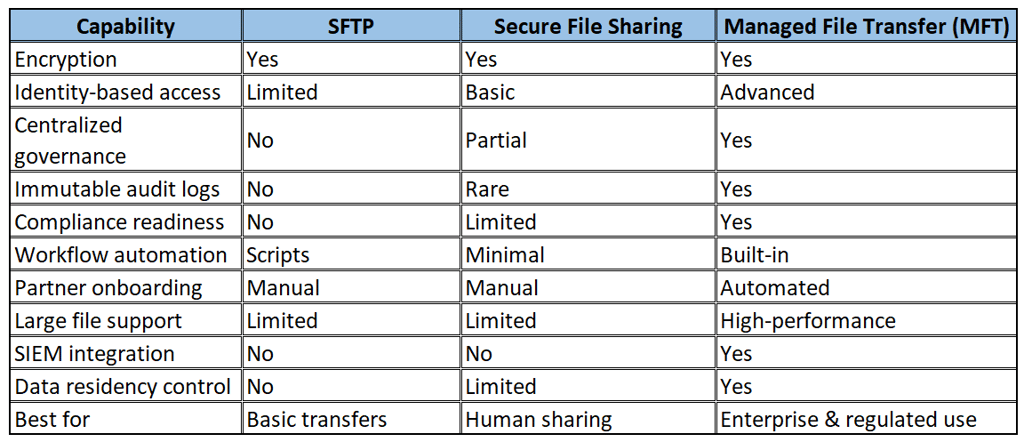
Side-by-Side Comparison
When Should You Move from SFTP to MFT?
Organizations typically replace SFTP when they:
Handle regulated data (HIPAA, SOC2, GDPR, DPDP, FedRAMP)
Need audit trails
Onboard many partners or vendors
Run automated workflows
Move large datasets
Require centralized control
Want Zero Trust security
Prepare for AI or analytics pipelines
At this point, SFTP becomes operationally risky and hard to manage.
→ See how to migrate: SFTP To Cloud Migration
Why Enterprises Choose Managed File Transfer
Enterprises adopt MFT because it delivers:
🔒 Security
Zero Trust, identity-based access, encryption, monitoring
📜 Compliance
Audit logs, WORM storage, retention policies
⚙ Automation
Workflows and partner onboarding
🚀 Performance
Parallel, high-speed transfers for large datasets
🌍 Sovereignty
Region-aware storage and routing
📊 Visibility
SIEM integration and real-time monitoring
These capabilities simply don’t exist in standalone SFTP or consumer sharing tools.
How Zapper Edge Implements Modern MFT
Zapper Edge provides an Azure-native Managed File Transfer platform designed for regulated enterprises.
It combines:
Zero Trust security
Compliance-ready controls
Immutable logs
High-performance transfers
Data residency enforcement
Secure partner exchange
Explore:
👉 Platform Overview → Managed File Transfer Platform
👉 Implementation Services → Zapper Edge Managed File Transfer Services On Azure
Frequently Asked Questions
Is MFT more secure than SFTP?
Yes. MFT adds identity controls, logging, governance, and monitoring beyond encryption.
Can MFT replace SFTP completely?
Yes. Most MFT platforms support SFTP protocol compatibility while adding stronger controls.
When should enterprises stop using SFTP?
When they require compliance, auditability, automation, or large-scale transfers.
Is file sharing enough for enterprise workflows?
No. File sharing is for people. MFT is for governed, system-level data movement.
What is the best SFTP alternative for enterprises?
A cloud-native Managed File Transfer platform with Zero Trust and compliance capabilities.
Next Steps
Ready to modernize beyond SFTP?
→ Explore MFT implementation services → Azure-based Managed File Transfer implementation services
→ Learn about Zero Trust architecture → Azure-based Managed File Transfer