Why Should You Move from Traditional SFTP Servers to Cloud-Native SFTP with Automated Key Rotation?
This article explains how Azure Blob Storage’s native SFTP with the local-user model eliminates the need for VM-based SFTP servers. It then shows how Zapper Edge layers automated key rotation, RBAC, self-service access, and SIEM-ready auditing on top to deliver a secure, scalable, and compliant enterprise SFTP platform.
ARCHITECTURE AND SCALABILITY
1/20/20266 min read


This article is part of Zapper Edge’s Zero Trust and AI-Ready Managed File Transfer knowledge series for regulated enterprises.
Reimagining SFTP for the Cloud Era: From VM-Based Servers to Native Azure Blob Security
Secure file transfer protocol (SFTP) has been the de‑facto way to exchange files securely for decades. Traditionally, organisations deploy an SFTP server on a virtual machine and expose port 22 through a firewall. While this works, the model has several drawbacks: you need to provision and patch the operating system, manage firewall rules, rotate SSH keys and passwords manually, and scale the server when workloads increase. The Zapper Edge platform re‑imagines managed file transfer by integrating Azure Blob Storage’s native SFTP support with a portal that automates key rotation, scaling and auditing. This article dives into the code behind Zapper Edge’s SFTP module, explains how it leverages Azure’s local‑user model for security and scale, and compares it with traditional VM‑based SFTP servers.
Challenges with traditional VM‑based SFTP servers
Before Azure introduced SFTP for Blob Storage, organisations built their own SFTP servers on VMs. Running a non‑native SFTP server means creating a VM, installing OpenSSH or FileZilla, configuring inbound firewalls and network security groups and managing patches and updates. Such servers offer full customization but come with downsides:
• High maintenance and complexity: You must maintain the operating system, update SSH software, monitor logs and patch vulnerabilities.
• Scaling requires more infrastructure: When file volumes or concurrent connections grow, you need to scale the VM vertically or add more nodes and load balancers. Network firewalls must also be updated.
• Security risk: Access keys and passwords are stored on the VM. Key rotation is manual, and misconfiguration increases the attack surface.
• Cost: You pay for VM compute and potential third‑party firewall licences. Under‑utilised VMs waste resources.
Because of these limitations, an alternative model that offloads maintenance and scales seamlessly is attractive.
Azure Blob Storage’s SFTP and the local‑user model
In late 2022 Microsoft released SFTP support for Azure Blob Storage, bringing a fully managed SFTP endpoint to storage accounts. Instead of running your own server, you enable SFTP on a storage account and manage local users. Key characteristics include:
• Local users: SFTP clients cannot be authorised by Microsoft Entra ID; instead, local users are used. Each storage account can host up to 25 000 local users. A local user authenticates using either a password or an SSH key.
• Authentication methods: You can enable password authentication or public‑private key authentication. Azure generates passwords; administrators cannot set them, and if the password is lost you must generate a new one. For keys, the private key remains with the user; Azure stores only the public key and supports up to 10 keys per local user.
• Container permissions: Administrators assign per‑container permissions (Read, Write, List, Delete and other flags) to each local user. A user can be granted access to up to 100 containers, and container permissions can be updated after creation.
• Scaling and performance: Azure Blob Storage scales linearly; throughput increases with more client connections until the storage account’s egress and ingress limits are reached. This lets SFTP workloads scale without provisioning more servers.
• Host key rotation: Azure periodically rotates the SSH host keys used by the service. Host keys are separate from user keys and rotation has no impact on the user’s SSH keys. Rotations are gradual and may take multiple weeks, and rotating secrets reduces attack vectors.
These capabilities provide a strong foundation for building a scalable and secure SFTP solution without managing VMs, but managing local users through the Azure portal is still an administrative task. Zapper Edge extends Azure’s SFTP service with a modern UI, RBAC, key rotation and audit trail.
How Zapper Edge implements SFTP management
Zapper Edge is a cloud‑native managed file‑transfer platform built on modern tech stack. The SFTP module uses Azure Blob Storage’s native SFTP support under the hood and adds features that enterprise customers expect. Key design elements include:
• Two user experiences:
– SFTP Users (admin interface): Administrators can list local users, filter by storage account and status, create or edit users, configure container scopes and toggle SSH or password authentication. They can also map local users to Zapper Edge portal accounts and set rotation policies. Row actions allow disabling or deleting users.
– My SFTP Access (end‑user interface): Portal users can see their mapped local user, container scopes and last rotation timestamps. They can trigger self‑service rotation of their SSH keys or passwords and download the new credentials for a limited time.
• Secure key and password rotation: When a user rotates an SSH key, the back‑end generates an RSA key pair in memory, updates the Azure local user via replaceAuthorizedKeys, stores only the fingerprint and caches the private key in an in‑memory token. After rotation, the server returns a one‑time token that allows the user to download the private key; the token expires after first use and nothing is logged.
For password rotation, Zapper Edge uses Azure’s setPassword to generate a random password (>32 characters). Because Azure does not allow custom passwords, the platform never stores or reveals passwords after this window.
• Role‑based access control: The platform defines granular permissions such as sftp.localUsers.create, sftp.localUsers.update, sftp.credentials.rotate.ssh.self and sftp.credentials.rotate.password.self. Only administrators can manage local users, and end users can rotate credentials only for their mapped account.
• Audit and compliance: Every administrative and user action emits an internal audit log and a Sentinel event. Events include metadata such as actor identity, local user ID, storage account, containers and rotation status. Private keys and passwords are never logged.
• Infrastructure and secrets: Zapper Edge uses Azure Managed Identity or a service principal with minimal permissions (Microsoft.Storage/storageAccounts/localUsers/read/write/delete) to manage local users. The code never stores secrets; only public keys and fingerprints are persisted, and secrets are kept in in‑memory caches for one‑time download.
Key rotation and security
Why rotate keys? Rotating SSH host keys and user credentials reduces the window of exposure if a key is compromised. Azure warns that periodic rotation is a standard security practice because it helps reduce attack vectors.
Self‑service rotation: Traditional SFTP servers require administrators to manually generate and deploy new keys. In Zapper Edge, end users can rotate their SSH keys with a single click. The system generates key pair, updates Azure, logs the rotation, and provides the private key via a one‑time token. For password authentication, Azure generates a new 32‑character password and Zapper Edge makes it available temporarily. Because Azure generates the password and doesn’t allow custom values, the risk of weak passwords is eliminated.
No secret storage: The platform never stores private keys or passwords; only fingerprints are persisted. Tokens used to download credentials expire after 120 seconds and are removed after one download. This ensures that compromised database access does not expose secrets.
Audit trail: Each rotation creates a rotation event record capturing the actor, rotation type, old and new fingerprint and status. This is separate from the general audit log and can be forwarded to Sentinel for monitoring and compliance.
Scalability and performance
Azure Blob Storage’s SFTP is designed for scale. Each storage account supports up to 25 000 local users and each user can access up to 100 containers. Azure stores only the public keys and allows up to 10 SSH keys per user. Because the service runs on Azure’s elastic infrastructure, throughput scales linearly with the number of concurrent connections until the storage account’s egress and ingress limits are reached. In practice this means that you can increase concurrency by adding more SFTP client connections without provisioning more servers. Administrators can also upgrade to premium block blob storage to achieve higher bandwidth per client.
Comparing Zapper Edge to VM‑based SFTP solutions
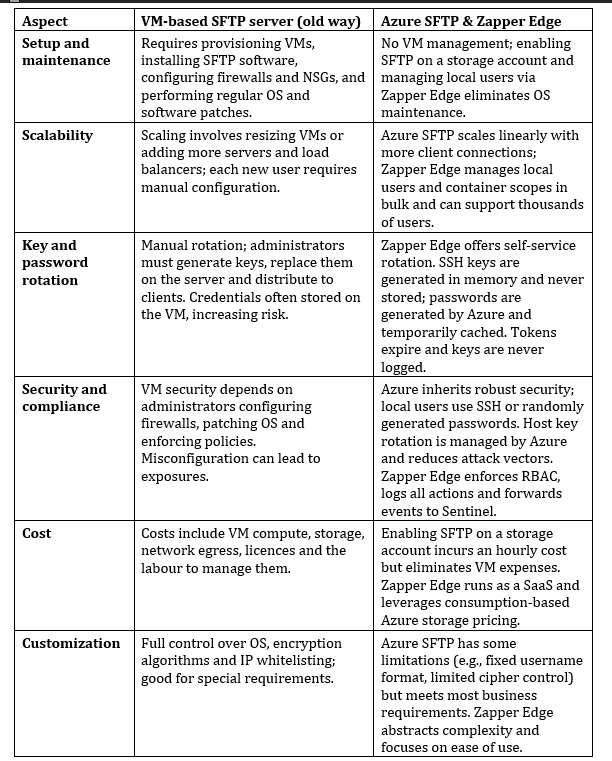
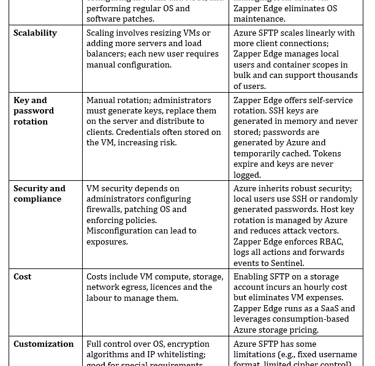
Comparing native SFTP on Azure Blob Storage with a non‑native VM‑based SFTP server provides a concise cost‑benefit analysis. The key differences, augmented by Zapper Edge’s implementation, are summarised below:
Conclusion
Traditional VM‑based SFTP servers served their purpose, but they place the burden of infrastructure management, scaling and security on the organisation. Azure Blob Storage’s SFTP support introduces a fully managed, scalable and secure alternative with local‑user authentication. Zapper Edge builds upon this foundation by providing a feature‑rich portal that automates user provisioning, enforces RBAC, enables self‑service key rotation and integrates auditing with Sentinel. Through its two‑pane interface—SFTP Users for administrators and My SFTP Access for end users—it simplifies management and empowers users to rotate keys without exposing secrets. With key rotation happening on demand, linear scaling up to thousands of users, and robust security inherited from Azure, Zapper Edge demonstrates how modern cloud services can transform legacy file‑transfer workflows into secure, compliant and scalable solutions.